

搜索到
23
篇与
实用代码
的结果
-
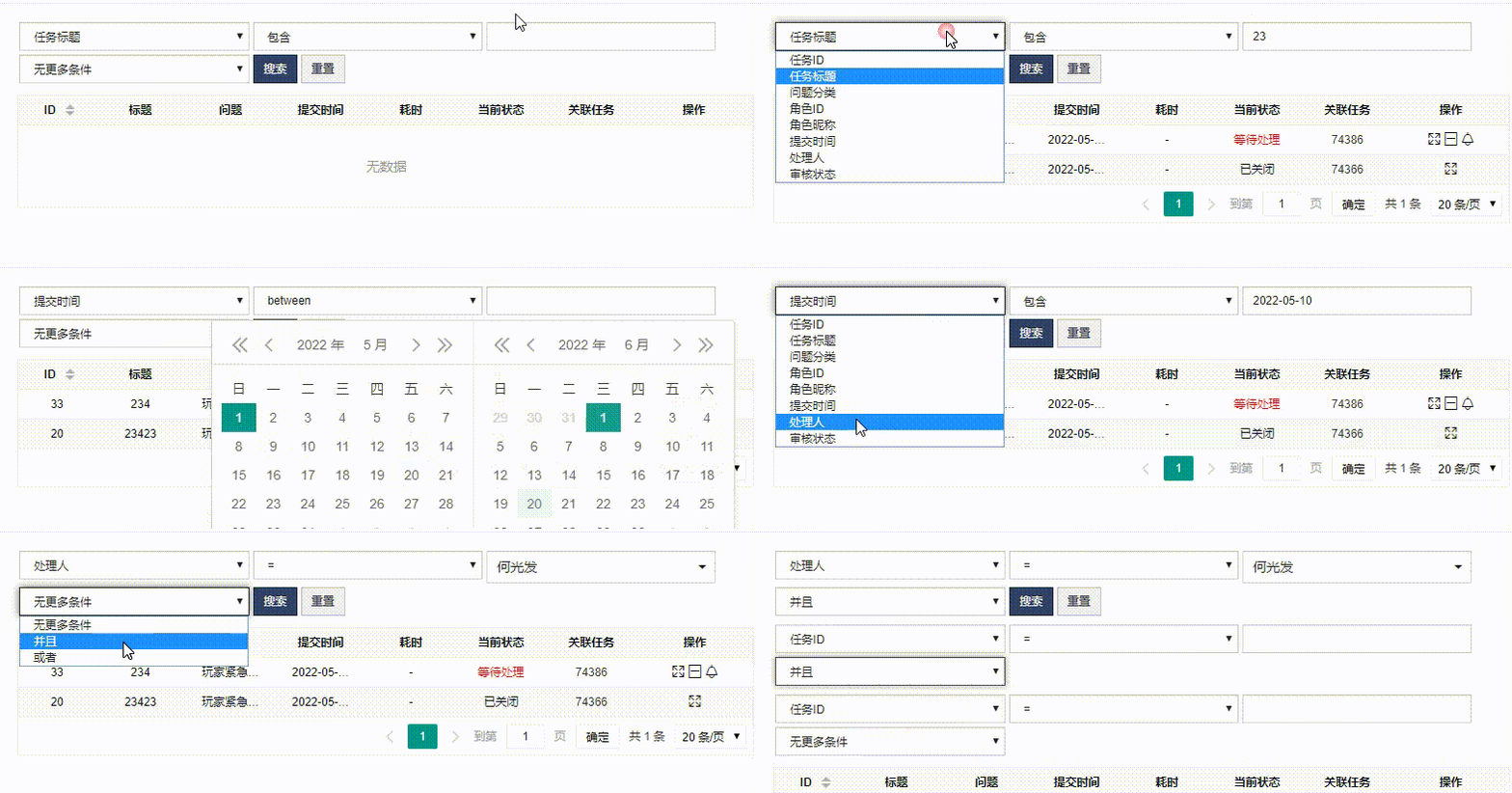
 基于layui Table的一个简单搜索功能,支持多条件搜索 给公司老系统开发功能,老系统的搜索模块需要提交整个页面,而且代码很乱配置很杂。于是基于layui Table自己手写了一个简单搜索功能,可以多条件搜索。就这样吧,记录一下,以后再优化。 # 获取用户列表 (可选,select下拉选项) $ulist = $this->administration->getUserListByValid("account as k,realname as v"); # 待搜索字段 $searchFields = [ ['text'=>'维修产品型号','field' => 'typeid','type' => 'input','values'=>''], ['text'=>'维修日期','field' => 'repair_time','type' => 'date','values'=>''], ['text'=>'维修处理状态','field' => 'state_text','type' => 'input','values'=>''], ['text'=>'更好材料型号','field' => 'change_typeid','type' => 'input','values'=>''], ['text'=>'维修联系人','field' => 'repair_name','type' => 'input','values'=>''], ['text'=>'维修联系人电话','field' => 'repair_phone','type' => 'input','values'=>''], ['text'=>'经办人','field' => 'repair_account','type' => 'select','values'=>$ulist], ['text'=>'费用','field' => 'repair_money','type' => 'input','values'=>''], ]; $optionHtml = ""; foreach ($searchFields as $field){ $optionHtml .= '<option value="'.$field['field'].'">'.$field['text'].'</option>'; }<div style="padding-top: 20px;text-align: center;display: none" id="searchBox"> <!-- $searchFields array 字段列表 text 展示文字 field 数据库字段 type 类型 input 输入 select 下拉选择 date日期选择 values 默认值 type为select时 values为数组 k=>v $optionHtml 下拉选择 搜索键 前端依赖 jquery 选择器 zui 表单样式 layui.laydate 日期选择模块 --> <div class="" style="max-width: 720px;margin: 0 auto"> <!-- 初始化第一个搜索条件 --> <div class="row searchBox searchBox_1" data-index="1"> <div class="col-xs-3"> <select class="form-control input-sm" id="field_1" onchange="ayFieldChange(1,this.value)"> <?php echo $optionHtml; ?> </select> </div> <div class="col-xs-2"> <select class="form-control input-sm" id="condition_1"> <option value="eq"> = </option><option value="gt"> > </option><option value="lt"> < </option><option value="elt"> <= </option> <option value="egt"> >= </option><option value="nq"> 不等于 </option><option value="%"> 包含 </option> </select> </div> <div class="col-xs-3" id="value_box_1"> <input type="text" class="form-control input-sm" id="value_1" placeholder=""> </div> <div class="col-xs-2"> <select class="form-control input-sm" id="where_1" onchange="ayWhereChange(1,this.value)"> <option value=""> 无更多条件 </option> <option value="and"> 并且 </option> <option value="or"> 或者 </option> </select> </div> <div class="col-xs-1"> <button class="searchBtn btn btn-sm btn-blue">搜索</button> </div> <div class="col-xs-1"> <button class="closesearchBtn btn btn-sm btn-blue">清空搜索</button> </div> </div> <script> let nextIndex = 2; // 下一个搜索条件下标 let searchFields = <?=json_encode($searchFields)?>; // 搜索字段数据 let optionHtml = '<?=$optionHtml?>'; // 搜索字段下拉option /** * 监听选中搜索字段 生成对应类型的输入框 * @param index * @param fieldValue */ function ayFieldChange(index,fieldValue){ for(var i = 0;i<searchFields.length;i++){ var tempFields = searchFields[i]; if(tempFields.field == fieldValue){ if(tempFields.type == "select"){ var inputHtml = "<select class='form-control input-sm' id='value_"+index+"'>"; for(var k=0;k<tempFields.values.length;k++){ inputHtml += "<option value='"+tempFields.values[k]['k']+"'>"+tempFields.values[k]['v']+"</option>"; } inputHtml += "</select>"; $("#value_box_"+index).html(inputHtml); }else if(tempFields.type == "date"){ var inputHtml = '<input type="text" class="form-control input-sm" id="value_'+index+'" placeholder="">'; $("#value_box_"+index).html(inputHtml); console.log("value_"+index); layui.laydate.render({ elem: "#value_"+index ,type: 'date' }); }else{ var inputHtml = '<input type="text" class="form-control input-sm" id="value_'+index+'" placeholder="">'; $("#value_box_"+index).html(inputHtml); } } } } /** * 添加搜索条件 * @param index * @param where */ function ayWhereChange(index,where){ if(index < nextIndex-1) return; if(where == "and" || where == "or"){ var html = '<div data-index="'+nextIndex+'" class="row searchBox searchBox_'+nextIndex+'">'+ '<div class="col-xs-3">' + '<select class="form-control input-sm" id="field_'+nextIndex+'" onchange="ayFieldChange('+nextIndex+',this.value)">' + optionHtml+ '</select></div>'+ '<div class="col-xs-2">'+ '<select class="form-control input-sm" id="condition_'+nextIndex+'"> '+ '<option value="eq"> = </option><option value="gt"> > </option><option value="lt"> < </option><option value="elt"> <= </option>'+ '<option value="egt"> >= </option><option value="nq"> 不等于 </option><option value="%"> 包含 </option>'+ '</select> </div>'+ '<div class="col-xs-3" id="value_box_'+nextIndex+'">'+ '<input type="text" class="form-control input-sm" id="value_'+nextIndex+'" placeholder="">'+ '</div>'+ '<div class="col-xs-2">'+ '<select class="form-control input-sm" id="where_'+nextIndex+'" onchange="ayWhereChange('+nextIndex+',this.value)">'+ ' <option value=""> 无更多条件 </option>'+ ' <option value="and"> 并且 </option>'+ ' <option value="or"> 或者 </option>'+ '</select>'+ ' </div>'+ '</div>'; nextIndex++; $(".searchBox_"+index).after(html) } } /** * 获取所有搜索条件 * @returns {any[]} */ function buildSearch(){ var searchBoxlist = $(".searchBox"); var where = new Array(); for (var i = 1;i<=searchBoxlist.length;i++){ var line = {}; line['field'] = $("#field_"+i).val() line['condition'] = $("#condition_"+i).val() line['value'] = $("#value_"+i).val()==undefined?"":$("#value_"+i).val() line['where'] = $("#where_"+i).val() where.push(line); if( line['where'] == "") break; } return where; } </script> </div> <!-- 搜索轮子 --> </div> <!-- --------------------- 搜索结束 --------------------- -->// 监听搜索 $(".searchBtn").click(function (){ var where = buildSearch(); table.reload('testReload', { page: { curr: 1 //重新从第 1 页开始 } ,where: { where } }); }) // 清空搜索 $(".closesearchBtn").click(function (){ table.reload('testReload', { page: { curr: 1 //重新从第 1 页开始 } ,where: [] }); }) /** * 构建where条件 * @param $where * @return string */ public function buildWhereSql($where){ $conditionChar = ["lt" => "<", "gt" => ">", "eq" => "=", "nq" => "<>", "egt" => ">=", "elt" => "<=",]; if(!$where){ return " 1 = 1 "; } $sql_str = ""; $next_where = ""; foreach ($where as $row){ if($next_where){ # 如果还有条件,使用上一次的连接条件 拼接SQL $sql_str .= " ".$next_where; } # 开始拼接where条件 $field = $row['field']; # 字段 $condition = $row['condition']; # 条件 $value = $row['value']; # 值 $s_str = " `$field` "; if($condition == "%"){ $s_str .= " like '%$value%'"; }else{ $zcahr = isset($conditionChar[$condition])?$conditionChar[$condition]:"="; $s_str .= " $zcahr '$value'"; } $next_where = $row['where']; $sql_str.=$s_str; if(empty($next_where)) break; } return $sql_str; }
 -
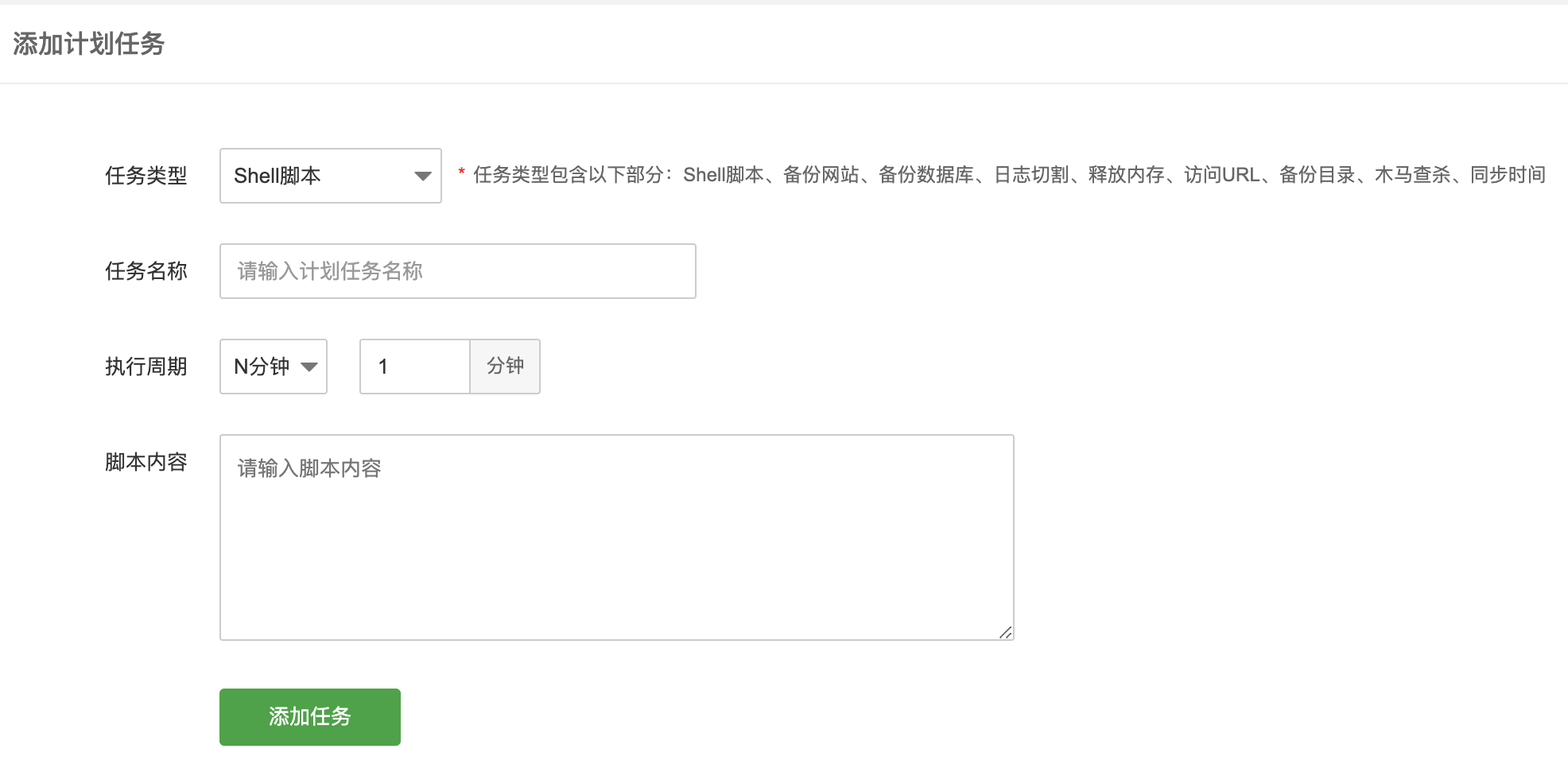
宝塔设置秒级监控,10秒15秒30秒定时执行访问 宝塔最低只能设置1分钟监控,但是往往我们需要更高频率的监控,那么我们可以使用shell脚本实现这个功能。打开宝塔面板,点击【计划任务】任务类型:shell脚本任务名称:随便谢谢执行周期:【N分钟】 1脚本内容:#!/bin/bash step=10 #单位:秒;间隔的秒数,不能大于60。需要几秒监控就填几 for((i=0;i<60;i=(i+step)));do curl -s http://www.0en.cn/(你需要监控的地址) endDate=`date +"%Y-%m-%d %H:%M:%S"` echo "★[$endDate] Successful" echo "---------" sleep $step done; exit 0
-
JS唤起Win10消息通知 // 判断浏览器是否支持唤醒 if (window.Notification) { let popNotice = () => { if (!Notification.permission === 'granted') return const notification = new Notification('阿巴阿巴', { body: '提示提示提示' }) // 点击通知的回调函数 notification.onclick = function () { window.open('https://baidu.com') notification.close() } } /* 授权过通知 */ if (Notification.permission === 'granted') { popNotice() } else { /* 未授权,先询问授权 */ Notification.requestPermission(function (permission) { popNotice() }) } }